
"Analytics is on the site" is a sentence designers say when a snippet exists in the project. It is not the same as a property the client owns, a container that was published, and a page view you watched arrive. The gap shows up when they ask for a report and the account is yours, or when two containers both fire and every session is double counted.
Do the install in order. Then verify it in two places: Google's own debugger, and a plain read of the homepage HTML.
The property is theirs
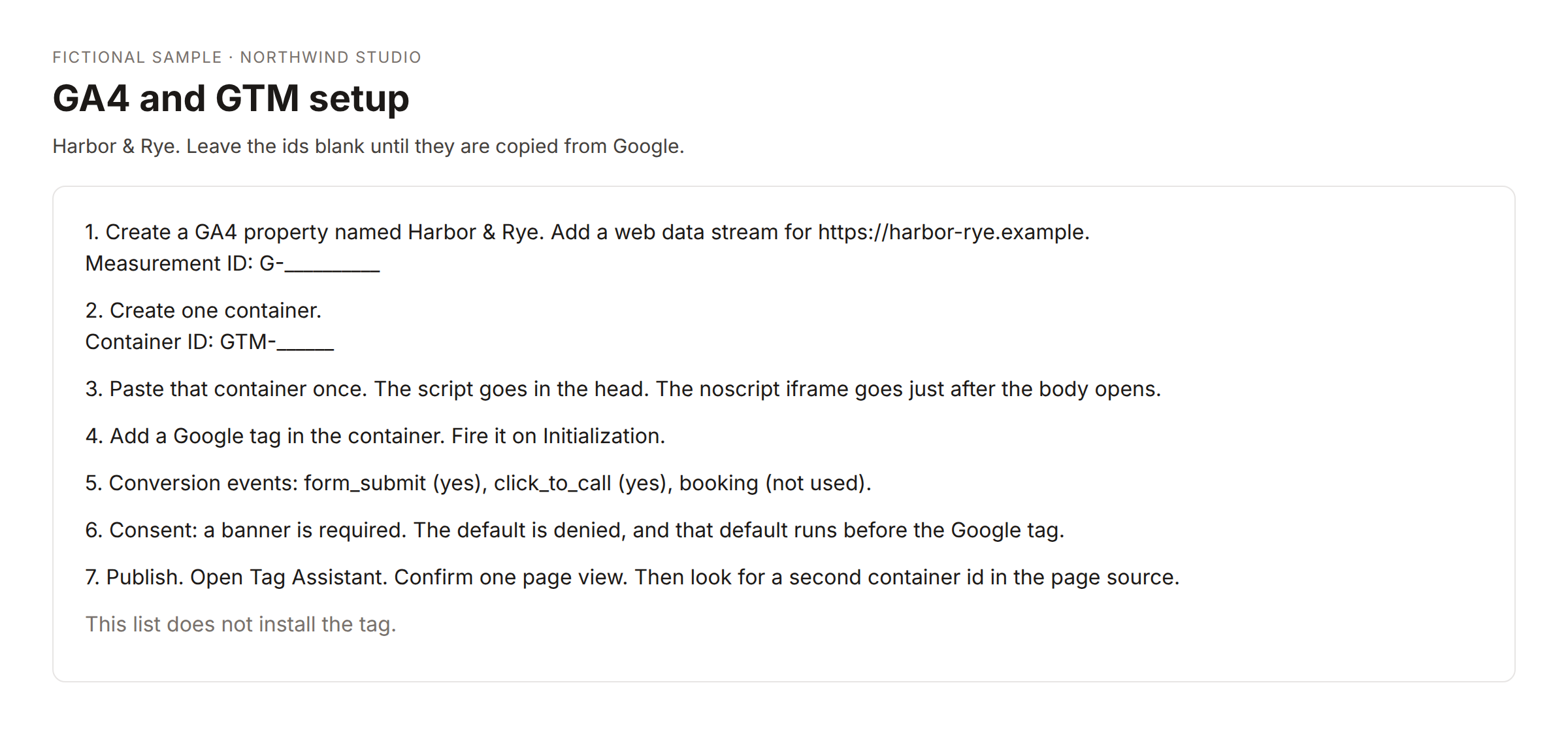
Create the GA4 property in the client's Google account, or in an account they can own after launch. Name it for the client or the site, not for your studio. Add a web data stream for the live URL. Copy the measurement id. It looks like G- and then letters and numbers. Leave it blank in your notes until you have copied it. A fake id in a doc is worse than an empty line.
If the site is still on a staging host, do not point the stream at staging and then forget. The stream that matters is the host you intend to index.
One container
Create one tag manager container for that site. Copy its id. It looks like GTM- and then a short code. Install it the way the platform documents: the script in the head, and the noscript iframe just after the body opens. One container. A second snippet from an old theme, a plugin, and a hardcoded tag is how duplicates happen.
In that container, add the Google tag (the GA4 configuration) and paste the measurement id. Fire it on Initialization - All Pages, or on All Pages if you do not have Initialization. Publish the container. An unpublished container is invisible to the site and invisible to a later HTML check. You will think you installed it.
Only the events the site can fire
Page views come from the configuration tag. Do not also mark page_view as a special conversion or you will confuse the client about what a "conversion" is.
Add events you can actually trigger:
- Form submit, on the thank-you state or the form's success event, if there is a form.
- Click to call, on
tel:links, if the phone number is real. - Booking, on the confirmation URL or the booking widget's success, if they take bookings. If they do not, skip it. A booking event that never fires becomes a sad report.
After one real or test hit, mark those events as key events in GA4. Do the test only if the client expects a test submission. A test lead in a mailbox they watch, with no warning, is not a verification. It is a support ticket.
Consent is a decision, not a plugin name
If the site needs a cookie banner, the default for analytics and ads storage should be denied until the visitor accepts, and that default has to run before the Google tag. If the site does not need a banner, write that decision in the handover in one sentence. Do not add a banner to look thorough.
A hint in the HTML (gtag('consent'…), ad_storage, analytics_storage) is evidence you looked. It is not a full test of the banner. The banner still needs a click-through by a person.
Verify, then read the HTML
Open Tag Assistant on the live URL, or GA4 DebugView, and confirm one page view. Then submit the one test you agreed to and confirm that event.
After that, it is worth a read-only fetch of the homepage and any extra URLs you care about, such as the contact page. You are looking for the G- id, the GTM- id, a consent hint, and more than one of either id. A GA4 id missing from the HTML while a GTM container is present is normal when the GA4 tag lives inside the container. Say that in the result so nobody "fixes" it by pasting the measurement id a second time.
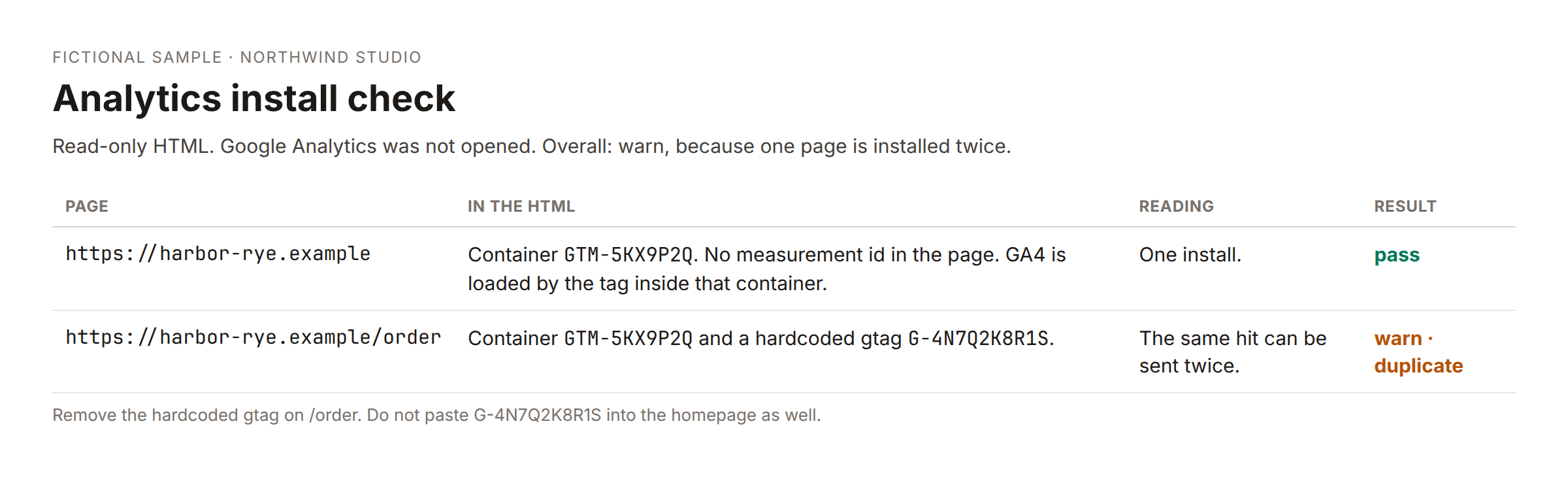
That sample warns because a container and a measurement id were found and a consent hint was not. The duplicate line is empty. The check did not log into Google Analytics. It cannot see tags that were never published, and it cannot tell you the property's permissions. It can tell you the live HTML and the container you think you published disagree.
Run it once when status moves to launched, and from a form when you want to recheck a URL. A pass does not need to be repeated every morning. A miss can be checked again the next weekday until you publish.
What to hand over
The client should be able to open the property without you. Admin access in their account, the container permission, and the ids written in the handover. Your studio login as a temporary admin is fine during the build. It is not the end state.
If a workflow records the check, the sheet row is the URL, the ids found, consent, duplicates, and pass, warn, or fail. It is not a substitute for Tag Assistant. Use both. The debugger shows the hit. The HTML read shows what a stranger's browser received.
A clean handoff of access
Before you call the install done, open the property as the client, not as yourself. If you cannot, because the property lives in your studio account, move it or add them as admin and put the date you will remove your own admin in the handover. "We will sort access later" is how you still own the numbers in a year.
Write the container id and the measurement id in the handover only after you have seen them on the live site. If Tag Assistant shows a hit and the HTML read does not show the container, you are looking at a cached page or a different host. Check www and the bare domain. One of them is often the one you forgot.
Do not install a second analytics plugin "so the numbers match the host's dashboard." Two collectors is the duplicate the HTML check is there to catch. Pick one.
Where the steps live
A skill can walk you through the order and refuse to invent ids. A launch checklist can hold the same steps as ticks. The workflow is only the afterward. If you only install the workflow, you have a detector and no tags.
There is a short free template for form posts, and there is a studio workflow for the HTML read. Neither one creates the property. The skill and the checklist are the install. Link them in your own launch notes so the next site does not depend on memory.
Community version
I kept finding client sites with two tag manager snippets, or with a GA4 id that only existed in a Google doc and not on the live page.
The order I use now: property in the client's account, web stream for the live URL, one container, configuration tag published, then only the events the site can fire. Form and click-to-call are the usual ones. Booking only if they book. Consent is either a default-denied banner that runs before the tag, or a sentence in the handover that says they do not need one.
I verify in Tag Assistant, then I fetch the HTML and look for G- and GTM- and a second copy of either. A missing G- next to a present container is normal if the tag is inside the container. I write that down so I do not paste it twice.
The fetch does not log into Google. Publishing the container is still my job. A checklist with blank ids is more honest than a checklist full of placeholders I never replaced.
I also open the property while logged in as the client before I call it done. If the property is still in my studio account, that is not finished. www and the bare domain both get a look, because I have shipped the tag on only one of them before.